Download SPlayer best media player for free and full mei 2013

SPlayer is a media player that supports most popular formats, including : 
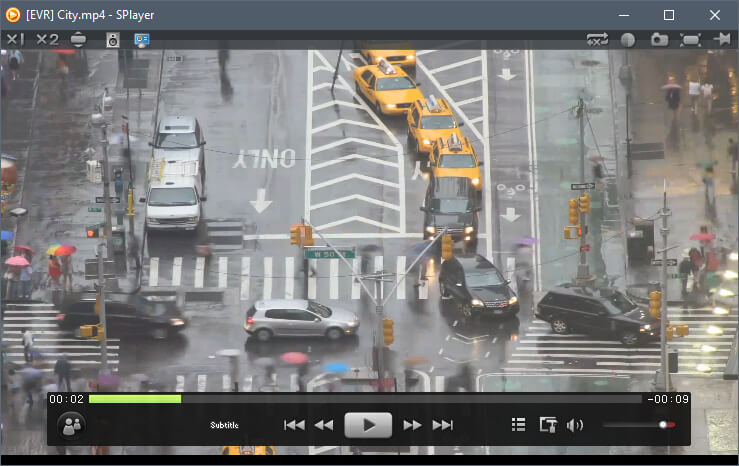
AVI, MP3, WMV, 3GP, OGG, VOB and MKV. The user interface of the program is very attractive due to its simplistic lines. You can import music and movies by using the file browser or the "drag and drop" method. Thus, you can add files to a playlist, create and organize favorites, load the recently played tracks, load subtitles and enable "Smart Subtitle Matching". You can also increase volume over 100% (till 1000%), switch to full screen mode, use an equalizer and channel controller, and take a snapshot.
Furthermore, you can enable loop mode (for the current track or the entire playlist), toggle between quality and performance mode, enable GPU acceleration, use a shader editor, as well as save images or thumbnails from a video. In addition, you can configure audio settings and 3D mode, flip the image and change aspect ratio, view file properties and select the action after playback (e.g. exit program, shutdown computer).
When it comes to the user interface, you can disable Aero Effect mode, switch from minimal to standard view, adjust the level of transparency and use a DSM converter. The program uses a high amount of system resources. It doesn't include a help file, but, other than that, SPlayer is very simple to use even by novices. We definitely recommend it if you want a clean and fresh perspective when it comes to playing media files.

Screenshot :


Features :
  • HD
ShaderEngine : image enhancement engine, reducing screen noise while rendering sharp picture quality
LiveColor : color enhancement algorithms, presenting vivid images
SmartAmplifyTMIntelligent sound field balancing technology, giving your ears a treat
  • Low consumption
FastMotion : significantly reduces CPU and memory footprint. Optimizated for modern multi-core CPU and GPU
PowerTravel power-saving mode, reducing energy consumption and increasing the battery time for notebook
EyeCare : takes care your eyes for long time watching, ensuring a healthy viewing experience
  • Intelligent
Anti-Silly : smart, fuzzy-logical configuration, hundreds of branch logics automatically select the best mode based on the hardware configuration.
CloudMatching : Intelligent Subtitle Display technology, no longer need to google matching subtitles for foreign language films
  • Delicate beauty
After a number of enthusiastic users giving professional advices and design assistance, SPlayer interface focuses at simple, stylish, functional integrity without affecting the general use
For more Information visit the own website : http://www.splayer.org/

to download software file installer.. click download button..

»»  Baca Selengkapnya...

Posted in | Leave a comment

Download VLC Media Player Latest and Full Version on Mei 2013


What is VLC ?

VLC media player (informally just VLC) is a highly portable free and open-source cross-platform media player and streaming mediaserver written by the VideoLAN project.

Supported Format?

VLC media player supports many audio and video compression methods and file formats, including DVD-Video, video CD and streamingprotocols. It is able to stream over computer network and to transcode multimedia files.[7]

The default distribution of VLC includes a large number of free decoding and encoding libraries, avoiding the need for finding/calibrating proprietary plugins. Many of VLC's codecs are provided by the libavcodec library from the FFmpeg project, but it uses mainly its ownmuxer and demuxers and its own protocols. It also gained distinction as the first player to support playback of encrypted DVDs on Linux and OS X by using the libdvdcss DVD decryption library.


Operating system compatibility

VLC media player is a cross-platform media player, with versions for Microsoft Windows, OS X, GNU/Linux, Android, BSD, Solaris, iOS, Syllable, OS/2, eComStation, BeOS, and QNX.[7]However, forward and backward compatibility between versions of VLC media player and different versions of OS are not maintained over more than a couple or so generations.

Windows 8 support

The VLC port for Windows 8 is backed by a Kickstarter campaign to add support for Microsoft’s new Metro/Modern GUI, it could bring support for DVDs, VCDs and unencrypted Blu-ray discs which are not supported in Windows 8.[27] All the existing features including video filters, subtitle support and an equalizer will be present in Windows 8.
Android support

In May 2012, the VLC team stated that a version of VLC for Android was being developed. A beta version has been made available on Google Play.


DOWNLOAD LINK


How to download file ?
- klik one of the link above
- wait about 7 or 5 seconds, then klik skip/skip ad (upper right corner)
- last, wait untill download dialogue appear, klik download..

For More Software in This Blog,, follow this link : Software Multimedia Komputers
»»  Baca Selengkapnya...

Posted in | Leave a comment

Download GOM Player 2.1.47.5133 Terbaru 2013 Free Full Version

GOM Player 2.1.47.5133 Gratis Full Version. GOM Media Player merupakan perangkat lunak pemutar video media player yang saat ini sangat populer didunia dengan sepenuhnya gratis.
Tidak hanya gratis namun GOM Player juga didukung dengan built-in mendukung untuk dapat memutar semua format audio dan video yang paling populer maupun format yang jarang kita temui, serta banyak fitur canggih yang ada didalamnya, customizability ekstrim, dan Codec Finder layanan yang dibberikan Gom Player ini.
GOM Media Player didesain dengan user friendly untuk memudahkan anda dalam memenuhi semua kebutuhan pemutaran audio/video Anda. Dengan jutaan pengguna di ratusan negara.


SCREEN SHOT:


Keunggulan utama GOM Media Player :

Codec Finder
GOM Player mencakup banyak codec (XviD, DivX, FLV1, AC3, OGG, MP4, H263 dan lebih) sehingga Anda tidak perlu menginstal codec terpisah untuk video yang paling. Bagi mereka yang membutuhkan video codec yang terpisah, GOM Player akan menemukan satu.

Play Broken AVI Files (Patented)
Teknologi yang dipatenkan GOM Player memungkinkan pengguna untuk melihat file dengan indeks rusak atau yang masih sedang didownload.

Powerful Subtitle Support
GOM Player mendukung SMI, SRT, RT, SUB (dengan BEI) file untuk subjudul. Anda bahkan dapat menyinkronkan subjudul dan video jika ada ketidakcocokan apapun.

Convenient Playlist
Jika Anda menjalankan file video dan sudah ada file dengan nama yang sama dalam direktori, maka akan secara otomatis ditambahkan ke daftar putar. GOM Player memiliki format yang sama seperti playlist M3U, PLS, ASX.

Support Different Media Types
Seiring dengan format media yang berbeda seperti AVI, MPG, MPEG dan DAT, GOM Player juga mendukung format streaming Windows media (WMV, ASF, ASX). Anda juga dapat menonton video berkualitas DVD dengan 5,1 channel audio output.


UPDATE DAN PERBAIKAN :

- Ditambahkan dukungan untuk Windows 8 / Windows 98SE.

- Default Transport Stream MPEG berubah.

- Ditambahkan pilihan Aspect Ratio tambahan.

- Masalah pemutaran Audio dikoreksi.

- RTL Dukungan Bahasa Subtitle sekarang diaktifkan secara default.

- Informasi File Playback sekarang akan mencakup versi GOM Media Player yang digunakan.

- Dikoreksi masalah keamanan

- Berbagai perbaikan dalam kalimat dan ejaan

- Masalah lain-lain lain telah ditangani dan diperbaiki.


Download GOM Player :
Free download Gom Player 2.1.47.5133 >>> DOWNLOAD ( 9.93 MB ) <<< 


Semoga bisa bermanfaat ....

For More Software in This Blog,, follow this link : 
Daftar Software Multimedia Komputers
***********************************************************************
»»  Baca Selengkapnya...

Posted in | Leave a comment